Meta Developer settings
Configure the platform's Meta app once — clients never enter their own app credentials.
Meta Developer settings
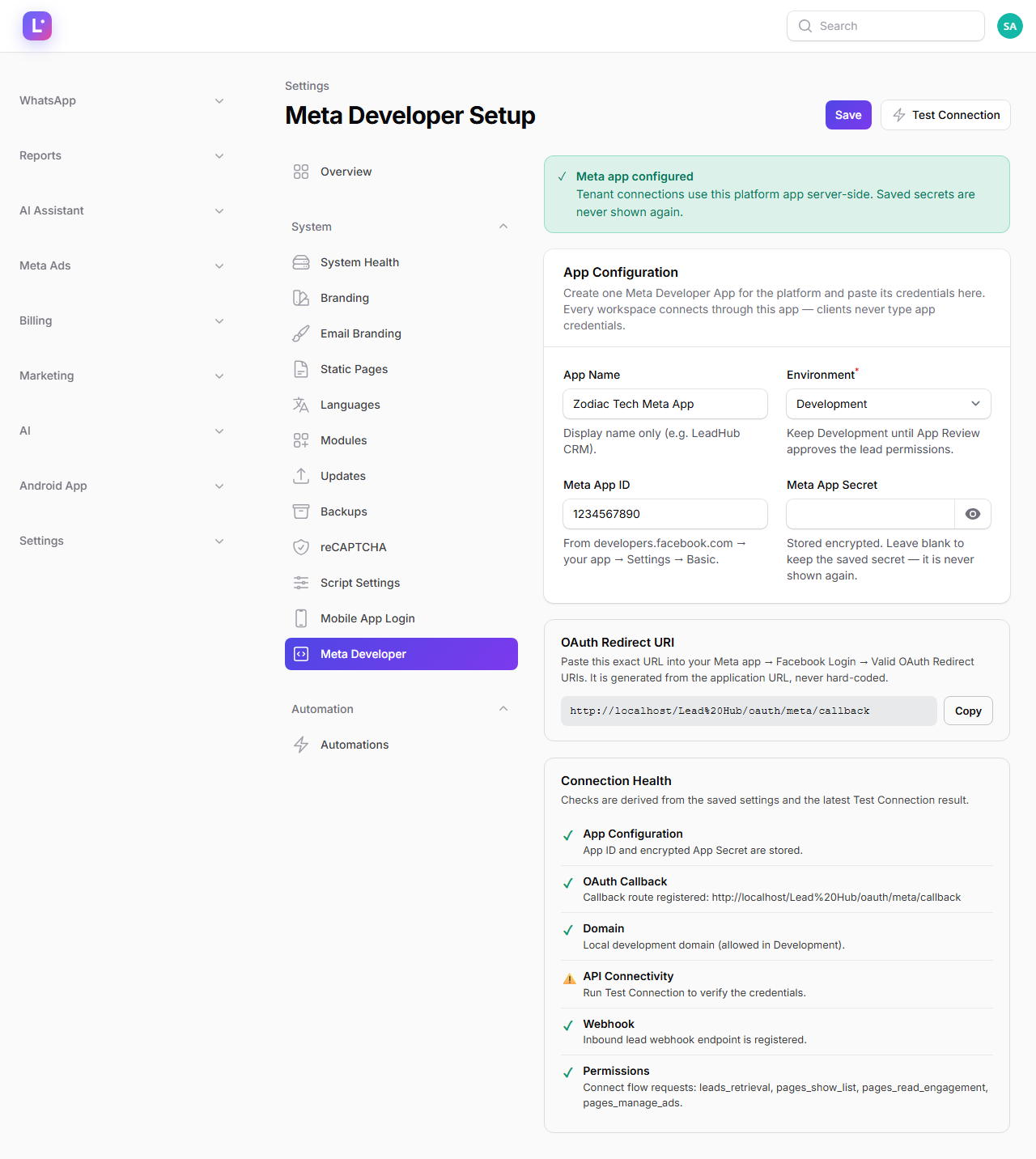
The platform uses one Meta Developer App for every client. You configure it once at Settings → Meta Developer (/super-admin/settings/meta-developer-settings), and every client authorization falls back to these credentials server-side. Clients connect with "Continue with Facebook" — they never type an App ID or Secret.
Who this is for
The person who owns the Meta Developer App (usually a Super Admin or the platform developer). This is an operator-only surface — the strings are deliberately plain to help non-developers.
- Difficulty: Advanced
- Time: 15 min
- Prerequisites: A Meta Developer account, an app created at
developers.facebook.com, and access to your domain's public URL settings.
Step 1 — Create the app on Meta's side
- Log in at
developers.facebook.comand create an app (type: Business). - Note the App ID and App Secret from Settings → Basic.
- In the app's Facebook Login settings, add the OAuth redirect URI shown on the Meta Developer page (see step 3).
- Add the lead permissions the connect flow uses:
leads_retrieval,pages_show_list,pages_read_engagement,pages_manage_ads.
Keep Development until App Review approves Newly requested lead permissions do not work in Production until Meta approves them. Keep the page on Development while testing; switch to Production only after App Review passes.
Step 2 — Enter the credentials
On Settings → Meta Developer, under App Configuration:
| Field | What to enter |
|---|---|
| App Name | Display name only (e.g. your product name) |
| Environment | Development / Production — see the warning above |
| Meta App ID | The App ID from Meta's Settings → Basic |
| Meta App Secret | The App Secret. Stored encrypted; it is never shown back to you |
The App Secret is write-only The secret is encrypted at rest (MetaSettings #[ShouldBeEncrypted]) and never rendered back. If you save the form with the secret field blank, the stored secret is kept. If you ever need to change it, paste the new one — you can never read the old one from this page.
Step 3 — Copy the OAuth redirect URI into Meta
The page shows the OAuth redirect URI to use. On this install it resolves to:
https://<your-domain>/oauth/meta/callback
Copy it into the Meta Developer App under Facebook Login → Settings → Valid OAuth Redirect URIs. If this does not match, client connections fail at the final step with an error from Meta.
Step 4 — Run Test Connection
Click Test Connection. The page makes a server-side client_credentials call to Meta to verify the App ID and Secret are valid. The result is shown immediately; a failure message explains what to fix (usually wrong credentials or an unreachable API).
Step 5 — Read the health card
The health card lists six checks:
| Check | Looks at |
|---|---|
| App Configuration | Are App ID and Secret saved? |
| OAuth Callback | Is the redirect URI resolvable on this install? |
| Domain | Is the public domain set up for Meta to call back to? |
| API Connectivity | Did the last Test Connection reach Meta? |
| Webhook | Is the Meta webhook endpoint configured? |
| Permissions | The connect flow's requested permissions |
Treat any non-green row as a client-facing risk: connections can still "look" successful while leads silently stop arriving.
Expected result
"Test Connection" succeeds, the redirect URI is saved in the Meta App, and a fresh client can connect their Facebook account through the guided setup without ever seeing an App ID or Secret.
Common mistakes
- Entering the App Secret on the client side. Not possible by design — if a client asks, tell them the platform owns the app.
- Switching to Production too early. Lead permissions must be approved by Meta's App Review first.
- Forgetting the redirect URI. Without it, client connections fail at the callback.
- Re-saving the form and expecting the secret to show. It never echoes back; blank keeps the stored value.
- Using one Meta app per client. Per-connection credentials exist as a fallback, but the standard is the shared platform app.
Troubleshooting
| Symptom | What to check |
|---|---|
| Test Connection fails | App ID / Secret typed correctly; check the health card's API Connectivity row |
| Client connect returns to an error page | Redirect URI mismatch — copy it from this page into the Meta app |
| Client connects but no leads arrive | Permissions and webhook rows; then the client-side allowlist — Meta lead capture pipeline |
| Everything green but leads stop after a while | Run leadhub:meta-health diagnostics — see Meta won't connect |
Technical details
- Page:
App\Filament\SuperAdmin\Pages\MetaDeveloperSettings(slugmeta-developer-settings, Settings cluster, group System). - Settings class:
App\Settings\MetaSettings, groupmeta_platform—app_name,app_id,app_secret(encrypted, never echoed),environment. - Fallback rule: tenant connections without their own credentials use the platform values (
OAuthConnectionController+MetaConnector); per-connection app credentials remain supported. - Redirect URI:
route('oauth.callback', ['source' => 'meta'])→GET /oauth/meta/callback. - Health card:
healthChecks()rows — App Configuration, OAuth Callback, Domain, API Connectivity, Webhook, Permissions. - Health job:
leadhub:meta-healthruns every 6 hours;leadhub:meta-ops-scanevery 30 minutes.
Related guides
Was this page helpful?
Thanks — noted. ✦