General & client FAQ
Straight answers for clients and end users — what the CRM is, what it needs, what it costs, data safety, the mobile app, and getting help.
General & client FAQ
The questions clients, owners and salespeople ask most — answered from how the product actually works. Every answer links to the deeper guide.
Setup & basics
What exactly is Zodiac Tech CRM?
A multi-tenant (multi-business) CRM built around Meta/Facebook lead generation: it captures leads from your Facebook pages and forms, assigns them to salespeople, drives follow-ups by call and WhatsApp, and reports on the whole funnel. The same platform runs many businesses side by side — yours is one isolated "Business" (workspace) with your own users, leads and settings. Start with What is Zodiac CRM?.
Do I need my own Facebook/Meta developer app?
No. Your provider configures one Meta app for the platform and it serves every client server-side. You connect with the normal "Continue with Facebook" flow — you never create a developer app or paste an App ID/Secret. If you do want your own Meta app, it can still be used through the same connection settings. Details: Meta Developer settings.
Is my Facebook password ever entered into the CRM?
Never. Connecting uses Facebook's official OAuth login — the password is typed into Facebook's own window, and the CRM only receives a permission token. You can revoke the app's access any time from your Facebook settings, and the CRM's Disconnect action removes the connection. See Connect Meta (Facebook).
How long does setup take?
The core path — connect Meta, choose your Page, pick lead forms, set up stages, add team, test a lead — is designed to be done in an afternoon; the guided setup walks you through 12 steps. See Quick start (15 minutes) and Client onboarding from zero.
Do I need WhatsApp to use the CRM?
No. WhatsApp is an integration, not a requirement. Without it you still get lead capture, routing, follow-ups, calls (via the mobile app) and reports. WhatsApp adds the inbox and template messaging when connected: WhatsApp Business API.
My account & data
Where does my data live, and can other businesses see it?
Your data lives in a database on your provider's server. Every record is stamped with your workspace's tenant id and a global scope (BelongsToTenant) restricts all queries to your workspace — a fail-closed design, meaning a missing scope returns nothing rather than everything. Super Admins can see operational diagnostics about your workspace (connection statuses, counts) from the platform panel; that access is role-controlled and audited. Background: Multi-tenancy & isolation.
Can I export my data?
Your leads and activity are readable through the CRM's REST API with a scoped API key, and reports can be scheduled for regular email delivery. A one-click "export everything" bundle is not part of the product today. Retention and privacy handling are described in Data retention & privacy (GDPR).
What happens if a payment fails?
Billing has a defined lifecycle: after a failed payment there is a grace period (typically 7 days) before features become restricted (CRM, leads, follow-ups and reports keep working; other features pause), and only a sustained non-payment leads to suspension. Exact behavior: Payment failures & restrictions and How billing & renewals work.
Can my leads be deleted or changed behind my back?
Changes happen through users you invite (each action tied to a role permission) and through integrations you connect. Lead contacts can also be erased on request under GDPR — after a mandatory 30-day cool-off — by the operator's erasure command. Nothing is deleted by third parties; see Data retention & privacy (GDPR).
People & devices
How do I add a salesperson?
Invite them by email from the Users screen; they choose their own password via the invite link. Assign a role — admin, manager or member (sales agent) — which determines what they see. Walkthrough: Add team members. Role capabilities: Roles & who does what.
Is there a mobile app? Is there an iPhone/iOS app?
There is an Android app (com.zodiactech.crm) with calling, offline queue, device health and push. An iOS app is not currently available.
Status: not currently implemented. iOS is not supported today. The web CRM works in a mobile browser, but calling and call-log features are Android-only.
See Installation and Demo APK for the app details.
Can a salesperson use the app without giving the CRM their entire phone?
The app requests specific Android permissions, not blanket access: call log (to match calls to leads), phone state (for dual-SIM detection) and notifications. Call recording is honest per device — the app never pretends to record on phones that block it. See Permissions and Call recording & what your phone supports.
How do I know everything is working before I trust it with real leads?
Run a test lead: the CRM creates a real lead end-to-end (tagged "Test Lead") and checks that creation, field mapping, assignment and follow-up all fired. Screenshot below shows the check panel.
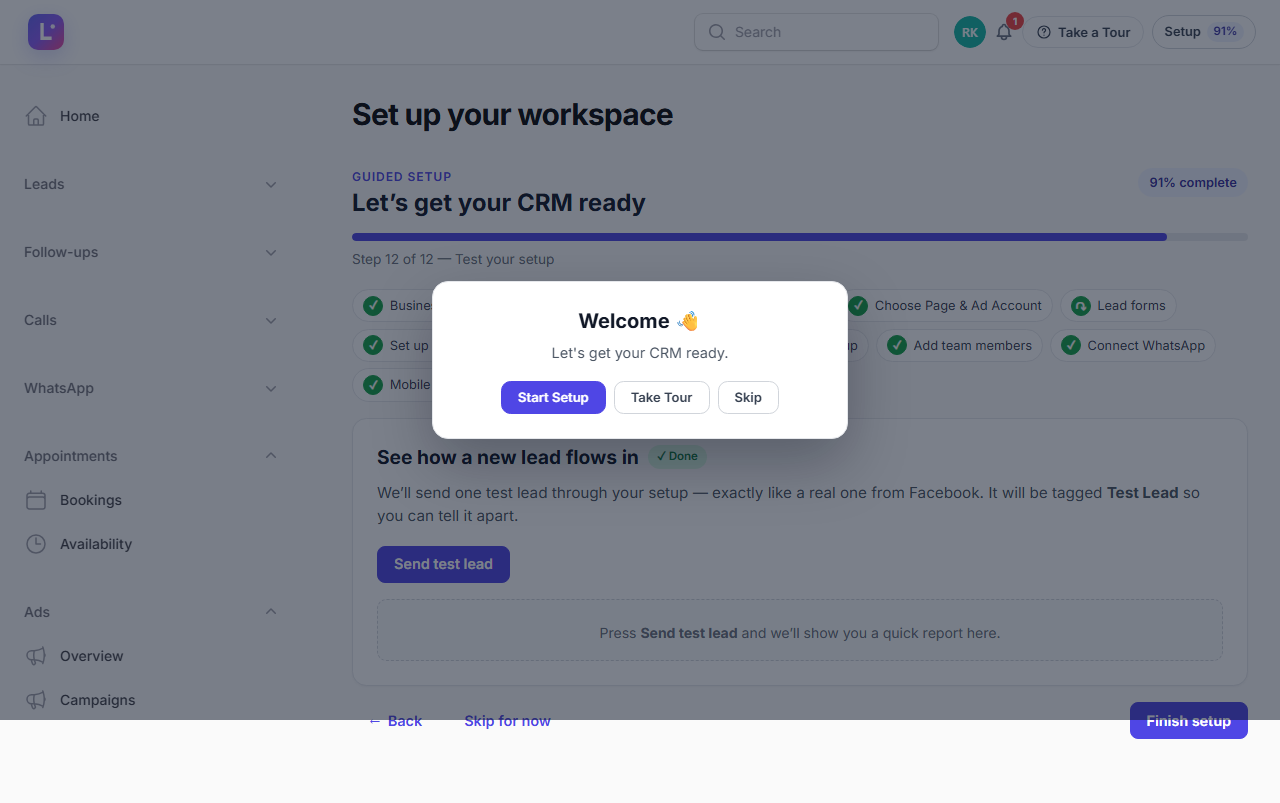
Try it: Test your setup. If something fails, Leads not entering the CRM covers the common causes.
Getting help
Where do I get support?
Start with the in-app Help Center (/admin/help) and this docs portal. For account-specific problems, contact your provider's support — useful starting points: Troubleshooting for symptoms, Daily checks for keeping the workspace healthy.
Was this page helpful?
Thanks — noted. ✦