Admin, Meta & WhatsApp FAQ
The operational questions admins ask most — Meta app credentials, WhatsApp windows and tokens, template rejections, lead form allowlists, notifications and billing states.
Admin, Meta & WhatsApp FAQ
The questions workspace admins and Super Admins hit while running Meta lead capture and WhatsApp messaging — answered with the real limits and error codes.
Meta & lead capture
Do I need to create a Meta developer app?
No. The platform provides one Meta app configured by the operator; your connections fall back to it server-side. Clients connect with the normal Facebook login and never touch App IDs or secrets. Operators manage this at Meta Developer settings.
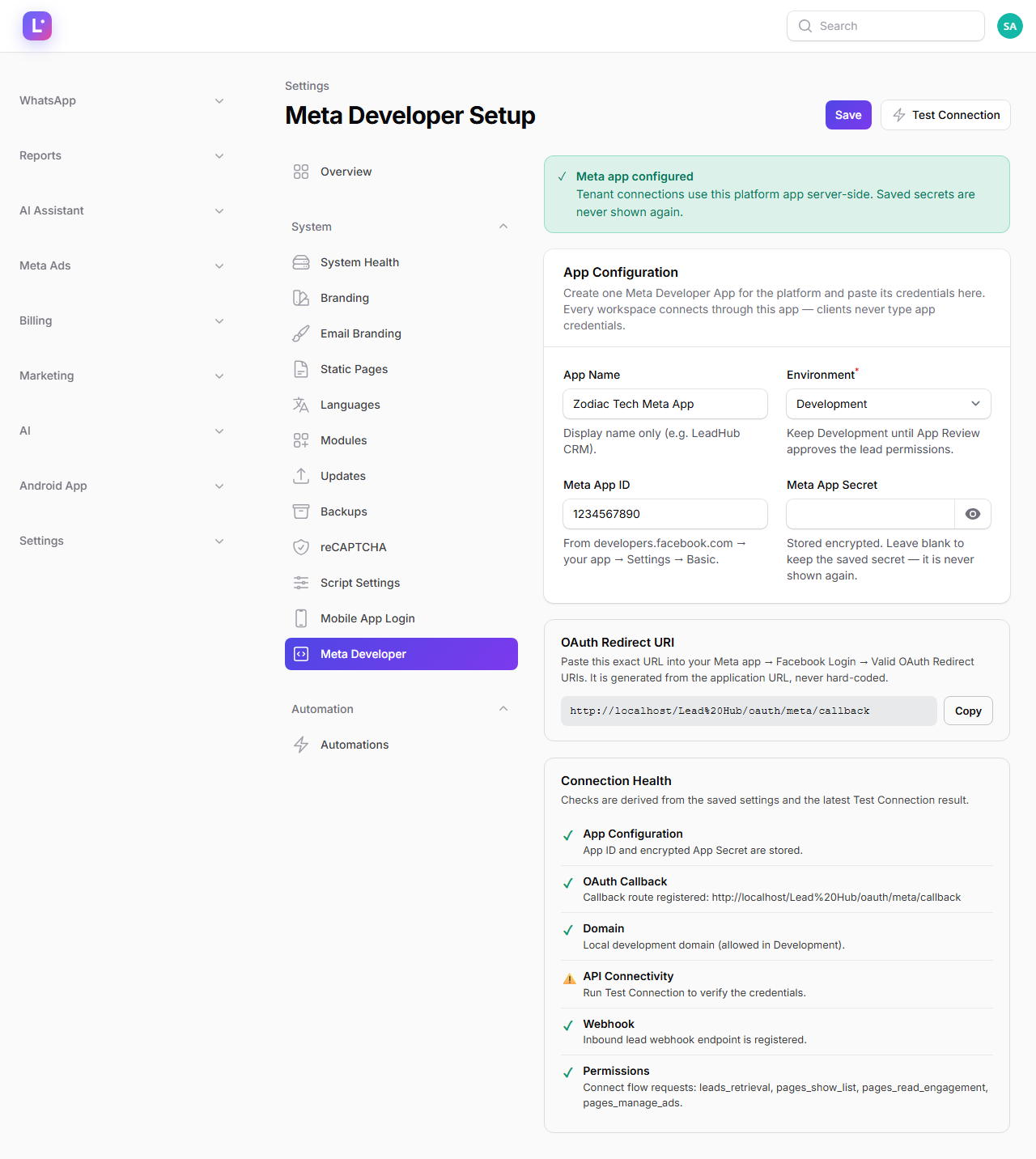
Can one Meta app serve multiple businesses?
Yes — that is the intended design. One platform Meta app handles many tenants; each business connects its own Facebook account and selects its own Page and Ad Account. Workspaces stay isolated; the shared app is only the API credential. See Connect Meta (Facebook) and Choose your Page & Ad Account.
Why do I see "Page access expired — reconnect"?
Facebook invalidates Page access tokens when permissions change, a password changes, or the app is removed from the account. The fix is in Lead Sources: click Refresh Pages to re-read what the account can see, then Reconnect if the token is dead. Leads stop flowing while the token is invalid, so reconnect the same day. More detail in Meta won't connect.
Can I limit which lead forms enter the CRM?
Yes. The CRM uses an allowlist: only the forms you explicitly select are ingested — forms on the Page that you did not select are ignored. Review or change the selection from the lead source connection in the guided setup; the ingest path is MetaLeadFormService with your selected forms. See Lead forms & mapping.
Why did my WhatsApp send fail with "re-engagement message" / error 131047?
You tried to send free-form text to a contact who has not messaged you in the last 24 hours. Meta only allows free-form inside that window; outside it you must send an approved template. The inbox respects this, and automations always send templates. See WhatsApp Business API.
Why is my inbound WhatsApp webhook rejected with 403?
The webhook signature check failed. Meta signs every delivery with X-Hub-Signature-256 using your App secret; if the secret stored on the connection does not match (or is missing while verification requires it), the CRM rejects the request — nothing arrives, but everything "looks" connected. Re-paste the correct App secret on the WhatsApp connection page.
How do I rotate the WhatsApp access token without breaking things?
Use Reconnect on the connection page and paste the new token. Secret fields show as masked (••••••••••••); leaving one untouched keeps the stored value, so you can rotate just the token. Save triggers an automatic health check, then click Test Message. See WhatsApp Business API.
Why did my template get rejected — and can I resubmit?
Meta reviews every template and owns the status: Pending Meta Review → Approved / Rejected / Disabled / Paused. A rejection shows Meta's reason in the CRM; fix the content and click Submit to Meta again from the template row. Note that a failed submission (network/auth) is not a rejection — the status is kept and the error is stored for you to retry. See Message templates.
An automation's WhatsApp step failed — where do I see why?
Open the automation's Run history. The send_whatsapp step records a failure code, in this check order: TEMPLATE_UNAVAILABLE, TEMPLATE_NOT_APPROVED, OPTED_OUT, WHATSAPP_NOT_CONNECTED, NO_VALID_PHONE, MISSING_TEMPLATE_VARIABLE, MEDIA_NOT_FOUND (plus WHATSAPP_ERROR for unexpected failures). OPTED_OUT writes no CRM message row by design. See WhatsApp automations.
A lead keeps messaging "stop" — do we have to remember that ourselves?
No. When an inbound message exactly matches an opt-out keyword, the lead is flagged automatically and future WhatsApp automation sends to them are skipped. Defaults: stop, unsubscribe, do not message. The keyword list has no settings screen yet — it is a tenant-level setting (automation.whatsapp_optout_keywords) an operator can adjust.
How do I test the WhatsApp setup without messaging a real customer?
Two safe options: the Test Message button on the connection page (send to your own phone), and a Manual Trigger automation run against a test lead. Also see the test-lead checklist.
Team, notifications & access
My salespeople say they get no notifications for new leads. Where do I look?
In-app notifications are always created. Push is optional and needs: a registered device (the user has logged into the app at least once), notification permission allowed on Android 13+, and an FCM service account configured. Check Push notifications (FCM), then Mobile not syncing / push not arriving.
Users are being locked out at login — what are the limits?
Web login locks an account after 5 failed attempts for 15 minutes. Mobile OTP requests are limited to 3 per identifier and 10 per IP per 10 minutes; 5 wrong code attempts destroy the code and require a fresh request. These limits are deliberate anti-abuse controls — see Cannot log in and Email or OTP not received.
What can the platform Super Admin see about my business?
Operational diagnostics, not your day-to-day work: on Super Admin → Businesses → open business there is a read-only WhatsApp section (connection status, verified name, WABA ID, last webhook time, automation and template counts, messages today, failures). Use it when support asks "what does the operator see" — Businesses (tenants).
Can a Super Admin edit my business's settings for me?
Super Admins can operate the platform (businesses, users, platform settings, billing) and diagnose via the read-only views. Routine CRM changes (stages, templates, team) are done inside your workspace by your own admins — if in doubt, ask support for the exact path in your workspace: Business Admin / Owner.
Billing states
What exactly stops working when a payment fails?
In order: the agreement moves to a grace period (about 7 days by default, everything still works), then restricted — CRM, lead management, follow-ups and reports keep working; other features pause — and only then suspended, which denies everything until payment resumes. See Payment failures & restrictions.
Where do I see invoices and receipts?
In your workspace billing area: Client billing portal, with the full commercial model at Billing overview. Payment providers (Razorpay/Cashfree) are configured by the operator — Payment providers.
Was this page helpful?
Thanks — noted. ✦