Reports
The numbers behind the work — volume, sources, funnels, bottlenecks, response time, revenue and scheduled email reports.
Reports
Reports answer the uncomfortable questions with real data: Are leads arriving? Where do they come from? Where do they get stuck? Who is answering fast enough? What did the ads actually earn? Every report reads live from your CRM database — no estimates, no invented numbers.
Who this is for
-
Admins — the whole picture.
-
Managers — team and pipeline performance.
-
Sales agents — your own numbers are visible in Team Performance and Revenue by Team Member.
-
Difficulty: Medium
-
Time: 15 minutes
-
Prerequisites: The
reportsplan feature. Reports appear in the sidebar for managers and above.
The report list
Open the Reports group in the sidebar. Each page has filters (date range, source, pipeline, user) and CSV / PDF export.
| Report | Question it answers |
|---|---|
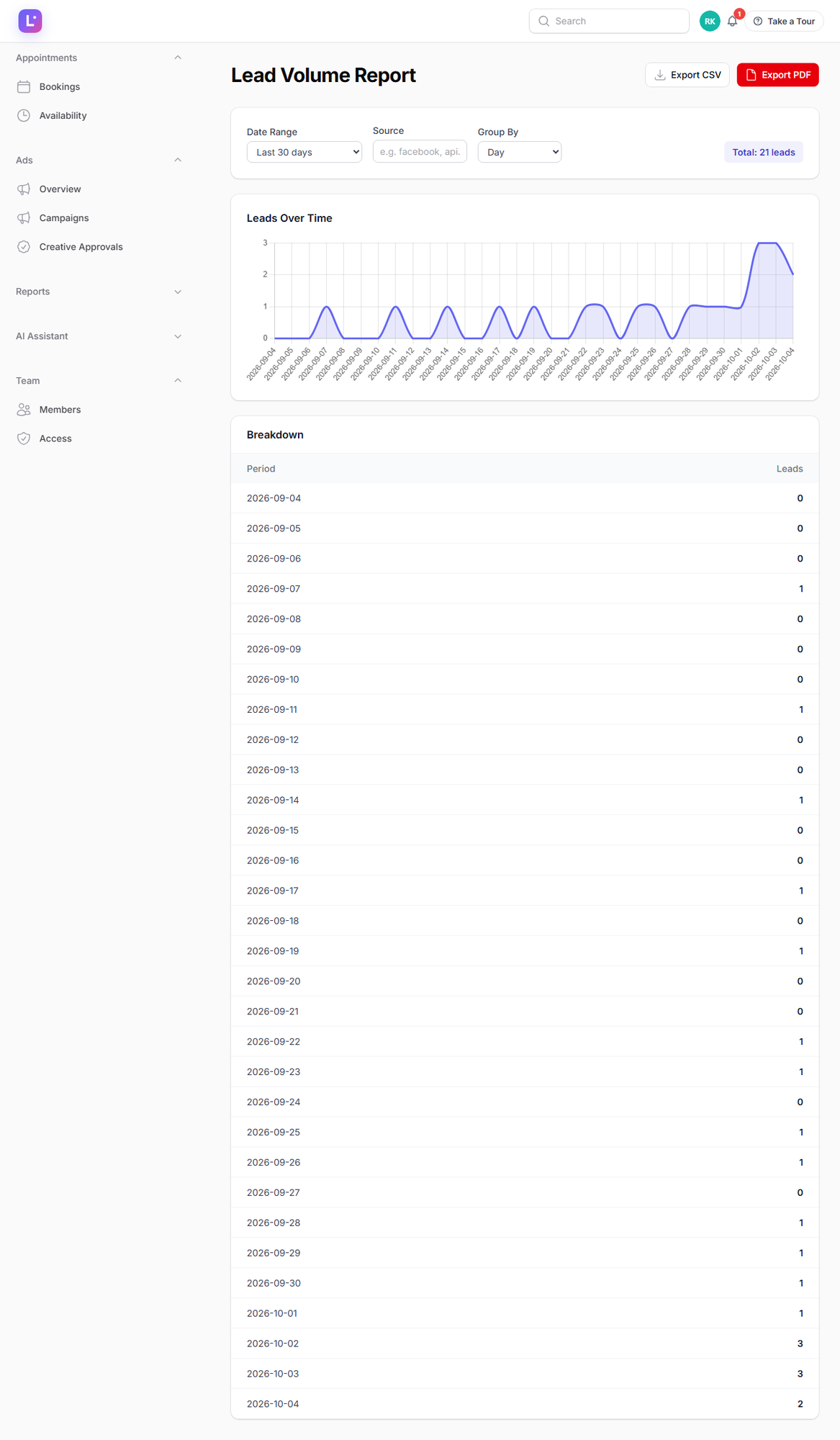
Lead Volume (/admin/lead-volume-report) |
How many leads arrived over time — by day/week/month, split by source. |
Source Performance (/admin/source-performance-report) |
Which sources deliver volume and quality (conversion, value). |
Source Attribution (/admin/source-attribution-report) |
UTM-based: which campaign (utm_source + utm_campaign) produced won deals and how much revenue — a lead counts as won when its status is converted or it has a won date. |
Form Analytics (/admin/form-analytics-report) |
Views vs submissions per lead form — where visitors give up. |
Sales Funnel (/admin/pipeline-funnel-report) |
Stage-by-stage drop-off: how many leads reach each step of your process. |
Where Leads Get Stuck (/admin/pipeline-bottleneck-report) |
Stages where leads sit longest — the fix list for your process. |
Team Performance (/admin/agent-performance-report) |
Per team member: leads handled, activities, conversions. |
Response Time (/admin/response-time-report) |
How fast leads get their first touch — by person and source. |
Revenue by Team Member (/admin/revenue-by-rep-report) |
Won revenue and won deals per rep. |
Follow-up Performance (/admin/email-sequences-report) |
Email sequence engagement: sent, opened, replied. |
Automation Performance (/admin/automation-stats-report) |
Which automations run, and what they achieve. |
Start every week with two reports Response Time (is anyone slow?) and Where Leads Get Stuck (where does the process jam?). Fix the worst number first — most revenue leaks are one of those two.
Scheduled reports (email delivery)
Don't want to open the CRM to see numbers? Schedule a report and it arrives by email.
1. Create a schedule
- Go to Reports → Scheduled Reports (
/admin/scheduled-reports). - Click New scheduled report and choose:
- Report type — dashboard stats, leads by source, pipeline distribution, agent performance, source performance, automation stats, or form analytics.
- Frequency — daily, weekly or monthly.
- Recipients — the email addresses that should receive it.
- Optional filters (date range/scope) where the type supports them.
- Save.
Expected result: the schedule appears in the list, marked active.
2. How delivery works
- Reports are generated and emailed in the morning (around 7 AM) for the chosen cadence.
- The delivery runner checks hourly (
reports:deliver), so the schedule survives restarts and missed windows. - Each delivery is exported as CSV/PDF and sent to the recipients.
Expected result: recipients get the report without logging in; you can pause or delete the schedule at any time.
Steps (reading any report)
- Open the report from the Reports menu.
- Set the date range first — most confusion is an unset range.
- Add filters (source, pipeline, team member) to isolate the question.
- Use the export button when you need the raw rows in a spreadsheet.
Expected result: a filtered, exportable answer to one specific question.
Expected result
You can run the business on numbers: response time targets, honest source quality, revenue per rep and campaign, and a scheduled email so the numbers come to you.
Common mistakes
- Comparing periods with different filters applied. Reset filters between comparisons.
- Blaming a source for bad leads when the response time is the problem. Check Response Time before cutting spend.
- Revenue counted twice. Won value is recorded once (at Mark won); editing the deal value afterwards does not rewrite history — adjust with the won amount instead.
- Ignoring form analytics. A form with high views and low submissions is a copy/UX problem, not a lead problem.
- Assuming emails sent instantly. Scheduled reports go out on the morning cadence; the hourly runner is the delivery mechanism.
Troubleshooting
| Symptom | Fix |
|---|---|
| A report is empty | Check the date range and whether the underlying feature is used (e.g. the UTM report needs tracking installed). |
| Scheduled report did not arrive | Confirm recipients, the scheduler is running (Cron & queue workers), and mail is configured (Email & SMTP). Check spam. |
| Numbers look stale | Pages cache aggregates briefly; refresh. Very recent activity (seconds old) may land on the next run. |
| Export is slow | Large exports may take a moment; keep the tab open until the download starts. |
Technical details
- Pages:
App\Filament\Pages\Reports\*plusSourceAttributionReport,PipelineBottleneckReport,RevenueByRepReport,EmailSequencesReport; all plan featurereports, manager-or-above navigation. Each supports CSV/PDF export. - Scheduled reports:
App\Filament\Resources\ScheduledReportResource;ScheduledReport::REPORT_TYPES= dashboard_stats, leads_by_source, pipeline_distribution, agent_performance, source_performance, automation_stats, form_analytics. Frequency daily/weekly/monthly; delivered by the hourlyreports:delivercommand. - Attribution: UTM fields live on
leads(utm_source,utm_medium,utm_campaign,utm_content,utm_term,landing_page,referrer_url) and Meta fields (meta_ad_id,meta_form_id); won recognised asstatus = 'converted'ORwon_at IS NOT NULL, revenue summed fromwon_value. - Ads-specific metrics (spend, CPL, ROAS) come from the Ads dashboard and
MetaAdsMetrics— see Campaigns.
Related guides
- Lead routing, scoring & health — the data behind health badges.
- Campaigns — spend vs CRM outcomes.
- Tracking & attribution — make the attribution report trustworthy.
- Daily checks — the routine that uses these reports.
Was this page helpful?
Thanks — noted. ✦