Call recording & what your phone supports
The honest truth about call recording on Android — three capability levels detected per device, where to see yours, and what to do at each level.
Call recording & what your phone supports
Call recording is the most over-promised feature in every CRM. It will not be over-promised here. Android and phone manufacturers restrict recording in different ways on different devices, so the app detects what your exact phone can do and tells you honestly. Some phones can record; some can only import recordings made by the phone's own app; some can only track call metadata. All three are useful; only the first two produce an audio file.
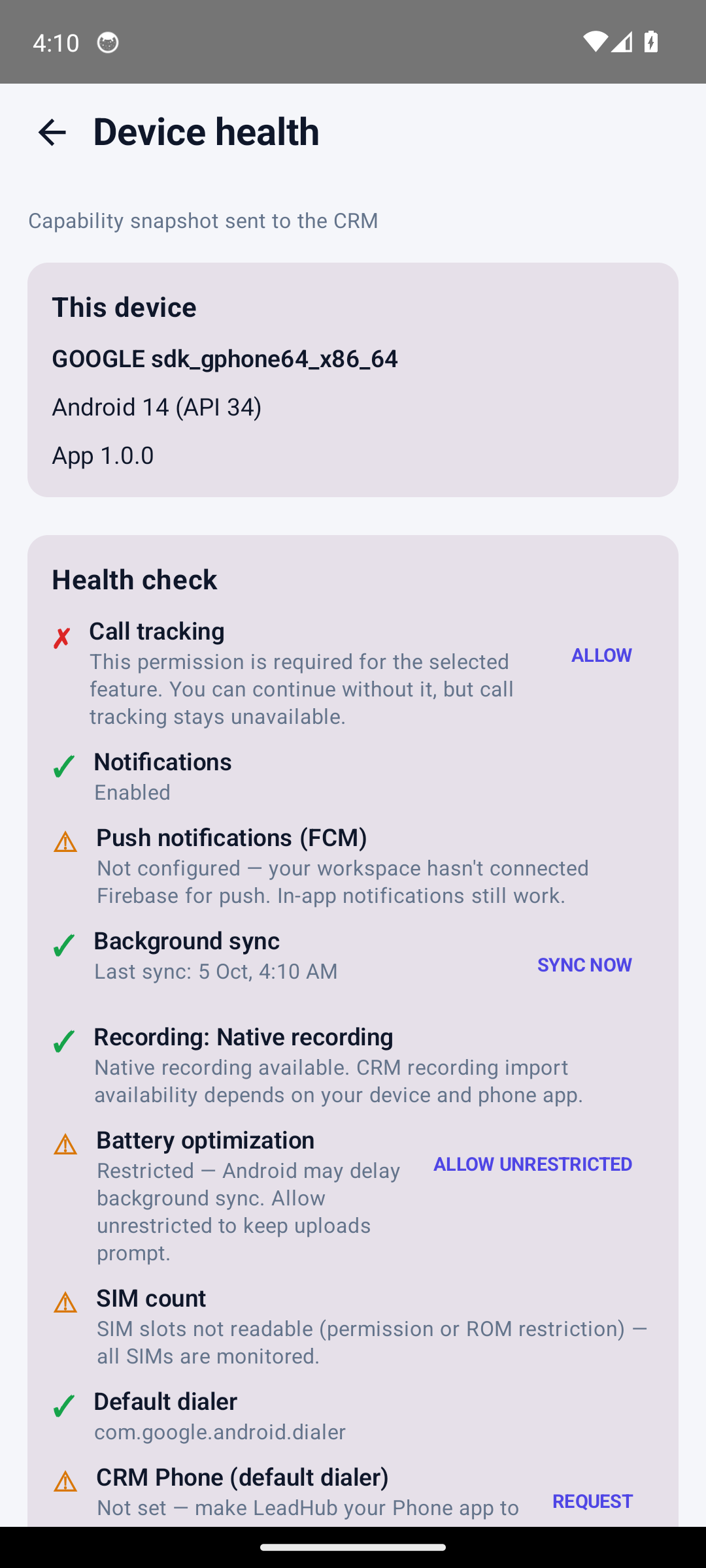
The Recording row on your own phone is the answer for your device — the level shown above is only what this test device reported.
Who this is for
- Sales agents wondering why recording is or isn't available on their phone.
- Admins answering "does the app record calls?" per device.
Difficulty: Medium · Time: about 7 minutes · Prerequisites: the app installed and logged in.
The three capability levels
Open More → Device health and find the row titled Recording: …. It resolves to one of four values, computed by the app's capability engine from the real state of the device:
| Level | Shown as | What it means |
|---|---|---|
| NATIVE_RECORDING | Recording: Native recording | A recognised phone/dialer app is set and the app found a recording folder it can actually read on this device. Native recording available. CRM recording import availability depends on your device and phone app. |
| IMPORTABLE_RECORDING | Recording: Importable recording | Your phone can record calls, but the default dialer is not one the app recognises. Your phone can record calls, but Android/OEM restrictions may prevent CRM access to the recording file. Calls still sync automatically. |
| METADATA_ONLY | Recording: Metadata only | No readable recording folder on this device. Recording isn't available on this device. Call tracking is still active. |
| UNKNOWN | Recording: Unknown | Detection itself failed on this phone. We couldn't check recording support on this device. Call tracking is still active. |
Two things to be clear about:
- The level is decided only by the phone's readable recording folders and its default dialer. It is never upgraded by toggling anything in the CRM, and holding the optional CRM Phone (default dialer) role does not grant recording.
- The detection is per device and manufacturer — two agents on two different phones in the same team can legitimately see two different levels. That is the correct, honest outcome.
Where to see it and how to act on it
- More → Device health, row Recording: …. The line under the row is the engine's explanation (quoted in the table above).
- Tap RE-CHECK DEVICE after anything changes (new dialer, new storage permission, new phone app).
- On the Native recording level, record calls with your phone's own recorder; where the app can read that folder, the recording is discovered and uploaded to the CRM.
- On the Importable recording level, recordings made by the phone may not be readable by the CRM because of Android/OEM restrictions. Calls still sync automatically — what may be missing is the audio file.
- On Metadata only, there is no recording to fetch. Calls, duration, direction and outcomes still sync, and everything is reportable.
- Extra recordings folder: if your phone/recorder saves to a non-standard location, set it in More → Settings → Call tracking → SAVE RECORDINGS FOLDER. The capability engine checks that folder too.
Why we do not promise universal recording Reading other apps' recordings depends on OEM public folders and permissions the operating system can remove at any time. Instead of silently failing, the app classifies the device honestly at install time and pushes the snapshot to your CRM, so admins can see — per phone — whether to expect audio. Never rely on "we'll fix it later" claims from any tool that promises recording on every Android device.
What the CRM does with recordings
- Discovered recordings are matched to calls (they must fall within a short window either side of the call) and uploaded to the CRM.
- Uploads are capped by the server at 20 MB and must be audio content; larger files or wrong types are rejected rather than silently dropped.
- Recordings are stored privately per business and streamed only to authorised users of that business — there is no public URL.
- Recordings are retained for 30 days by default; a nightly job purges older files while keeping the call metadata row (see Technical details).
Expected result
- Device health shows one of the four levels with a plain-language explanation.
- The same snapshot is visible to admins in the CRM (Super Admin → Android App → Devices).
- Nobody in the team is told they will get recordings their phone cannot provide.
Common mistakes
| Mistake | What happens | Fix |
|---|---|---|
| Assuming "CRM Phone" role enables recording | Role does not grant recording | Check the Recording: row — it is independent |
| Checking on a different phone than the agent's | Levels differ per device | Check Device health on the actual device |
| Recording manually, then logging out before sync | Local files may not be discovered | Leave the phone online and let sync/discovery run; use SYNC NOW |
| Expecting recordings to live forever | 30-day default retention | Download what you need from the CRM before it expires |
Troubleshooting
- "Recording isn't available on this device" — the honest metadata-only state. Call tracking keeps working; there is nothing to enable. If a third-party recorder writes to a folder, set it as the extra recordings folder and re-check.
- Recording exists on the phone but doesn't appear in the CRM — confirm the level is Native/Importable, set the correct folder, then SYNC NOW. Discovery scans the last 24 hours of calls per run (500 files max), so a large backlog may take more than one sync.
- Every device in the team shows metadata only — normal on many modern Android builds; it reflects OS restrictions, not an app fault.
Technical details
- Capability detection:
com.leadhub.sales.capability.CallCapabilityEngine(enumRecordingCapability:NATIVE_RECORDING,IMPORTABLE_RECORDING,METADATA_ONLY,UNKNOWN); snapshot pushed toPOST /api/v1/mobile/devices/capabilities(tabledevice_capability_snapshots). - Recording discovery:
RecordingDiscoveryWorkerscans the known OEM public folders (MIUI, Realme/OPPO, Vivo, Samsung/OnePlus, Nothing/Asus, plus the extra folder), 500 files per run, 24-hour lookback, matching within about ±90–180 seconds of a call. - Server side: recordings are validated (
audio/*, max 20 MB) and stored on the private disk underrecordings/{tenant_id}/{lead_call_id}/; they stream through the authenticated mobile routeGET /api/v1/mobile/recordings/{id}served byRecordingController. - Retention:
php artisan leadhub:purge-recordingsruns daily at 03:15 and deletes files older than 30 days, keeping the call metadata row marked expired (add--dryto preview).
Related guides
Was this page helpful?
Thanks — noted. ✦